Free UK delivery on every order · VAT shown up front · Upload your artwork after you pay

Category: Print guides

Plain-English guides to ordering print: paper, folds, booklets, sizes and artwork.

  • Print-ready artwork checklist: bleed, safe area, resolution and PDFs

    Print-ready artwork checklist: bleed, safe area, resolution and PDFs

    Getting your artwork right before you upload means your print comes out exactly as you expect, with no white edges, trimmed text or blurry images. Run through this checklist before you save your file.

    1. Set the right size

    Make your document the finished size of the product you’re ordering. You’ll find the size in each product’s description. For example, an A5 flyer is 148 × 210mm and a standard business card is 85 × 55mm.

    2. Add 3mm bleed

    Bleed is extra background that runs past the edge of your design and gets trimmed off when the print is cut. Add 3mm on every side, so an A5 flyer is supplied at 154 × 216mm and a business card at 91 × 61mm. Without bleed, you can end up with thin white slivers at the edges.

    3. Keep inside the safe area

    Keep text, logos and contact details at least 5mm inside the finished edge. Cutting can move very slightly, and anything too close to the edge could be trimmed. Avoid thin borders right at the edge, because they can look uneven once cut.

    4. Use high-resolution images

    Images should be at least 300 DPI at the size they’ll be printed. Pictures saved from websites or social media are usually far too small and will print blurry. Enlarging a small image doesn’t add detail.

    5. Design in CMYK

    Printing uses CMYK inks, while screens use RGB light. Bright RGB colours, especially vivid greens, blues and oranges, can look duller on paper. Setting your design to CMYK from the start gives the most accurate result.

    6. Embed fonts and flatten effects

    Embed your fonts when you export, or convert text to outlines, so nothing gets swapped. Flatten transparency, shadows and blend effects, which can sometimes print differently from how they look on screen.

    7. Check the details

    • Spelling, phone numbers, email and web addresses
    • Prices, dates and opening times
    • That double-sided designs have the front first and the back second
    • For folded leaflets, that each panel is in the right place (see our guide to folds)
    • For booklets, that pages are in reading order (see our booklet guide)

    8. Save as a PDF

    Export a print-ready PDF with bleed included. Upload your artwork as a PDF; for double-sided items, supply both sides in one PDF.

    When do I upload?

    After you’ve paid. We take you straight to the upload page, and the link is in your order confirmation email too. Once artwork is uploaded it goes into production automatically, so please check it carefully first.

    Prices on our site assume print-ready artwork is supplied; artwork changes or creation may be chargeable. Need a quantity or option you can’t see? Get in touch and we’ll help.
  • Flyer sizes explained: A7, A6, A5, A4, A3 and DL

    Flyer sizes explained: A7, A6, A5, A4, A3 and DL

    Choosing the right flyer size depends on how people will get it: handed out on the street, posted through a door, left in a rack or pinned to a wall. Here’s a quick guide to the standard sizes.

    Sizes at a glance

    • A7: 74 × 105mm
    • A6: 105 × 148mm (postcard size)
    • DL: 99 × 210mm (fits a standard DL envelope)
    • A5: 148 × 210mm (half of A4)
    • A4: 210 × 297mm (standard letter size)
    • A3: 297 × 420mm (double A4)

    What each size is good for

    • A7: tickets, vouchers, small promotions and anything to slip into a bag or wallet
    • A6: postcards, invitations, handouts and door drops on a budget
    • DL: price lists, menus and leaflets for racks and envelopes; the long shape is easy to hold
    • A5: the most popular flyer size, with room for a headline, images and details without feeling crowded
    • A4: detailed information sheets, menus and price lists, or flyers to pin to a noticeboard
    • A3: small posters and window displays

    Single or double sided?

    Single sided keeps your message simple and works well for notices. Double sided gives you twice the space, so you can put the attention-grabbing headline on the front and the details on the back.

    Paper

    Most flyers are printed on 150gsm or 170gsm silk. Go for 250gsm, 350gsm or 450gsm if you want a thicker, more premium feel. Uncoated paper is ideal if people need to write on it. Our paper weight guide explains the options.

    Need more space?

    If one sheet isn’t enough, a folded leaflet gives you four or six pages, and a stapled booklet gives you up to 64.

    Ordering

    See our leaflets and flyers from 100 up to 50,000 copies, with free UK delivery.

    Prices on our site assume print-ready artwork is supplied; artwork changes or creation may be chargeable. Need a quantity or option you can’t see? Get in touch and we’ll help.

  • What paper weight (gsm) should I choose for my print?

    What paper weight (gsm) should I choose for my print?

    Paper weight is measured in gsm, or grams per square metre. The higher the number, the thicker and stiffer the paper feels. Picking the right weight makes a big difference to how your print looks, feels and lasts.

    A rough guide to weights

    • 115–130gsm: light and flexible, the kind of paper used inside booklets and magazines
    • 150–170gsm: the everyday choice for flyers and folded leaflets; noticeably better than office paper
    • 250gsm: thick and sturdy, good for flyers that need to stand out or be kept
    • 350gsm: card weight; firm enough for postcards, menus and loyalty cards
    • 450gsm: very thick, premium card for business cards and high-end flyers

    Silk or uncoated?

    Silk art paper has a smooth, low-sheen coating. Colours look bright and images look sharp, which is why it suits most flyers, leaflets, posters and booklets.

    Uncoated paper has a natural, slightly textured feel. Colours print a little softer, but you can write on it easily with a pen. That makes it the right choice for letterheads, compliment slips, appointment cards and anything people need to fill in.

    What we recommend

    • Flyers and leaflets: 150gsm or 170gsm silk for handouts and door drops; 250gsm or above if you want them to feel premium or be kept
    • Folded leaflets: 150gsm or 170gsm silk folds neatly; 250gsm or 350gsm for menus and hard-wearing leaflets
    • Stapled booklets: 115gsm to 170gsm silk inside, with a heavier cover such as 250gsm or 350gsm for a more substantial feel, or the same paper throughout (self cover) for a lighter booklet
    • Business cards: 450gsm silk with lamination for a premium card, or 350gsm uncoated if you want to write on them
    • Letterheads and compliment slips: 120gsm uncoated works in most printers and takes ink well; 170gsm uncoated feels more premium
    • Posters: 170gsm silk for indoor posters; 250gsm or 350gsm if they need to stay flat or be handled

    Lamination

    Matt or gloss lamination adds a thin protective film. It makes cards and covers more resistant to scuffs and gives a more finished feel. Matt is subtle and modern; gloss makes colours pop. Laminated surfaces can’t be written on easily, so leave it off anything people need to write on.

    A note on VAT

    Many printed items, such as most leaflets and booklets, are zero-rated for VAT, while card items such as business cards are standard-rated. On our site, flyers and folded leaflets on 350gsm and 450gsm card include VAT. Our VAT information page explains how this works.

    Prices on our site assume print-ready artwork is supplied; artwork changes or creation may be chargeable. Need a quantity or option you can’t see? Get in touch and we’ll help.
  • Planning a stapled booklet: page counts, paper and covers

    Planning a stapled booklet: page counts, paper and covers

    Stapled (saddle-stitched) booklets are a great way to print brochures, programmes, catalogues, menus and reports. A little planning before you design will save time and help the finished booklet look its best.

    Why pages come in multiples of four

    A stapled booklet is made from sheets folded in half and stapled along the spine. Each folded sheet makes four pages, so the total page count is always a multiple of four: 8, 12, 16, 20 and so on up to 64 pages. The page count includes the front and back covers.

    If your content doesn’t fill the last page, add a notes page, a contact page or a full-page image rather than leaving it blank.

    Self cover or separate cover?

    • Self cover: the cover is printed on the same paper as the inside pages. It’s lighter and usually cheaper, and works well for programmes, newsletters and handouts.
    • Separate cover: the cover uses heavier paper than the inside, such as 250gsm or 350gsm silk. It feels more substantial and holds up better to handling, so it suits brochures, catalogues and menus.

    You can also add matt or gloss lamination to the cover, on the outside only or on both sides, for extra protection and a more finished look.

    Choosing inside paper

    • 115gsm silk: light and economical, good for higher page counts
    • 150gsm or 170gsm silk: a premium feel with less show-through from the other side
    • 120gsm uncoated: natural feel, easy to write on, good for workbooks and order-of-service booklets

    Portrait or landscape?

    Portrait booklets are bound on the long edge and are the most common choice. Landscape booklets are bound on the short edge, which gives wide pages that suit photography, plans and calendars. We offer landscape for A5 and A4 booklets.

    Which size?

    • A6 (105 × 148mm): pocket-sized guides and programmes
    • DL (99 × 210mm): slim booklets that fit a standard envelope and a rack
    • A5 (148 × 210mm): the most popular size for brochures, programmes and menus
    • A4 (210 × 297mm): reports, catalogues and magazines

    Setting up your artwork

    Supply your pages as a single PDF in reading order (front cover, then page 2, page 3 and so on, with the back cover last), as single pages, not spreads. Add 3mm bleed on every side and keep important text at least 5mm from the edge. Keep text well away from the spine on thicker booklets. Our artwork checklist covers the rest.

    Ordering

    See our stapled booklets in A6, A5, A4 and DL, from 25 copies up to 5,000. Booklets are normally zero-rated for VAT.

    Prices on our site assume print-ready artwork is supplied; artwork changes or creation may be chargeable. Need a quantity or option you can’t see? Get in touch and we’ll help.
  • Half fold, C-fold or Z-fold: which leaflet fold should you choose?

    Half fold, C-fold or Z-fold: which leaflet fold should you choose?

    A folded leaflet gives you more room than a flat flyer while staying neat enough to hand out, post or leave on a counter. The fold you choose changes how your reader moves through the content, so it is worth picking the right one before you start designing.

    Half fold (4 pages)

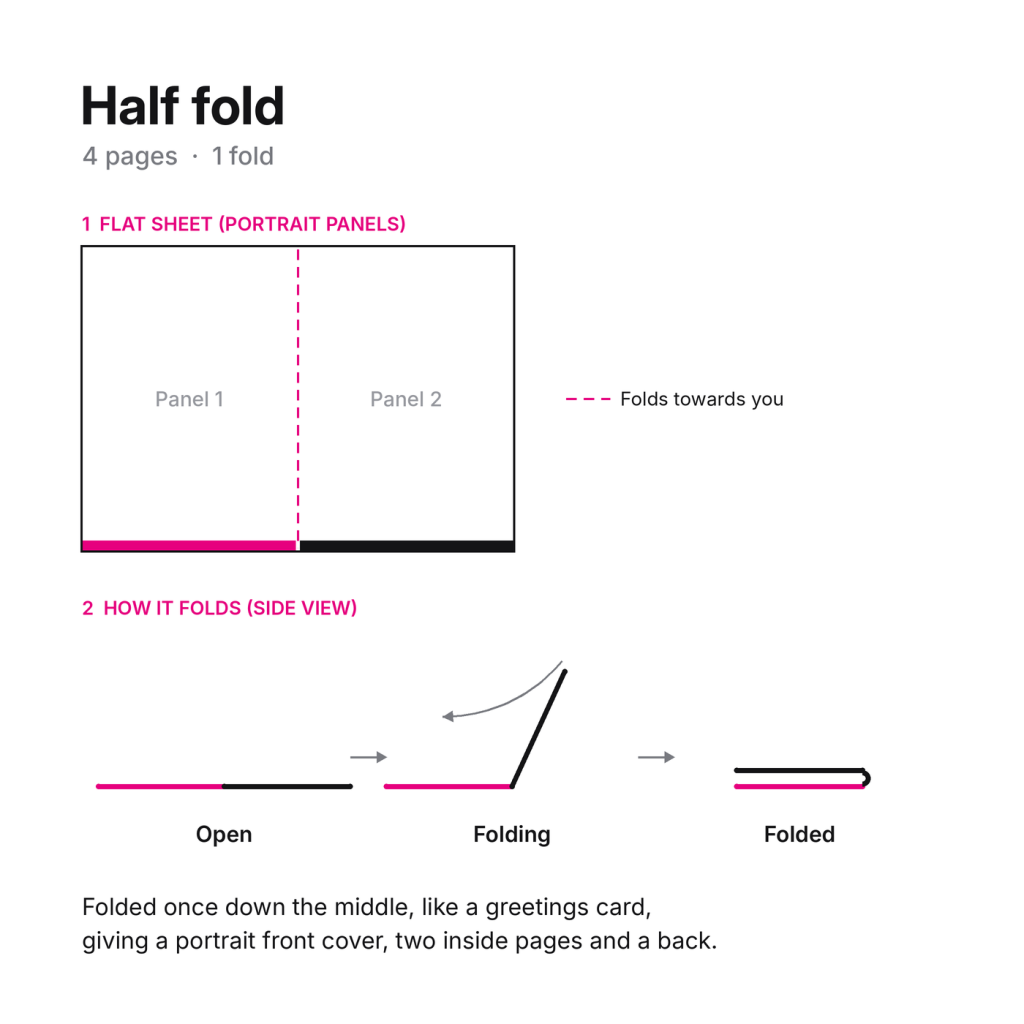
    A half fold is one fold down the middle, like a greetings card. You get a front cover, two inside pages that sit side by side and a back page.

    Diagram showing how a half fold leaflet folds

    Best for:

    • Menus and price lists that need a clear cover and an open spread inside
    • Event programmes, order of service and invitations
    • Simple brochures where you want one strong two-page spread

    C-fold or roll fold (6 pages)

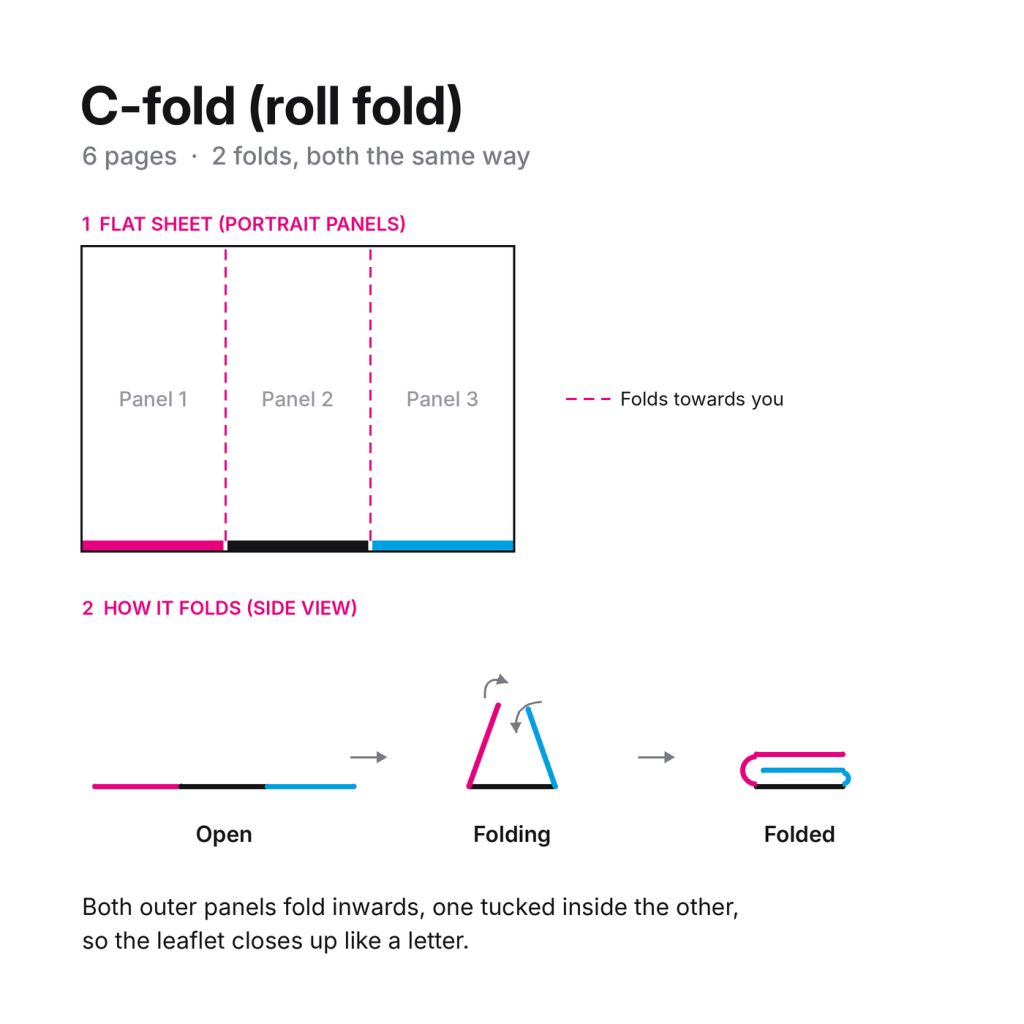
    A C-fold has two folds that go the same way. Both outer panels fold inwards, with one tucked inside the other, so the leaflet closes like a letter. The flap that tucks in is the first thing a reader sees when they open the cover, which makes it a good spot for a key message or offer.

    Diagram showing how a C-fold (roll fold) leaflet folds

    Best for:

    • Information leaflets that tell a story in order
    • Service and treatment menus
    • Mail-outs where you want the leaflet to stay closed

    Because one panel tucks inside the others, it should be designed a little narrower (usually by 2–3mm) so it doesn’t buckle at the fold. If you’re not sure, ask us before you finalise your artwork.

    Z-fold or concertina (6 pages)

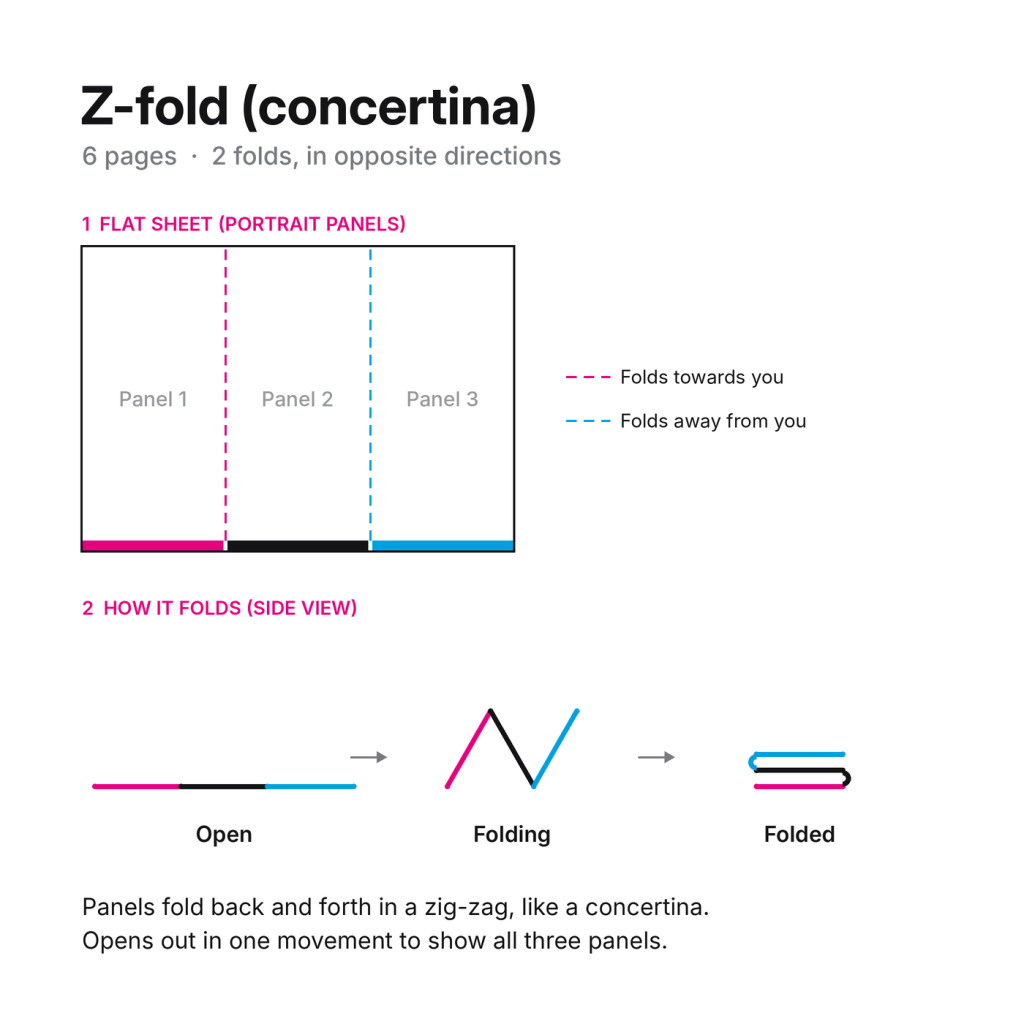
    A Z-fold has two folds in opposite directions, so the panels zig-zag like a concertina. It opens out in one movement to show all three inside panels at once, and all panels are the same width.

    Diagram showing how a Z-fold (concertina) leaflet folds

    Best for:

    • Maps, timelines and step-by-step guides
    • Price lists and timetables you want to read across in one go
    • Leaflets displayed in racks, where the front panel does the selling

    Quick comparison

    • Pages: half fold gives 4, C-fold and Z-fold give 6
    • Opening: half fold opens like a book, C-fold opens in two stages, Z-fold opens in one movement
    • Panel widths: half fold and Z-fold panels are equal; on a C-fold the tuck-in panel is slightly narrower

    Which paper?

    For most folded leaflets, 150gsm or 170gsm silk feels good in the hand and folds cleanly. Choose 250gsm or 350gsm silk if you want something sturdier, such as a menu that will be handled a lot. Our guide to paper weights explains the differences.

    Ordering

    Browse our folded leaflets in A6, A5, A4, DL and 1/3 A3. Each product page shows the fold diagram for the option you select, so you can check before you order.

    Prices on our site assume print-ready artwork is supplied; artwork changes or creation may be chargeable. Need a quantity or option you can’t see? Get in touch and we’ll help.